What Is Metabase: A Dev Agency's Guide to the BI Tool
Answering what is Metabase for agency founders. A direct guide to its architecture, use cases, and how it compares to Looker and Power BI for client work.
Metabase is an open-source BI platform launched in 2015 that’s been adopted by over 50,000 companies, with a free self-hosted edition that has no user limits or core feature gates. It’s designed for teams that need self-service analytics without the cost and complexity that usually come with enterprise BI tools like Looker or Power BI.
For a software development agency, the bigger value of Metabase usually sits in delivery, retention, and positioning rather than internal reporting. A free BI layer can become part of all three at the same time. If you build client systems, own data pipelines, or run growth reporting across delivery teams, Metabase can turn a database you already have into something clients use.
That matters because agencies rarely lose deals over raw engineering capability alone. They lose because they look interchangeable. A team that can ship software and give clients usable analytics, embedded dashboards, and visible decision support looks closer to a product partner than a body shop.
What Metabase Is and Why Agencies Should Care
Metabase is an open-source business intelligence tool that lets teams query their existing databases and turn the results into dashboards, charts, and shared reports without buying an enterprise BI stack.
For agencies, the practical point is simpler than the product category. Metabase cuts the friction between “we have the data” and “the client can use the data.” According to Valiotti’s Metabase review, Metabase was launched in 2015, has been adopted by over 50,000 companies, and its open-source edition is completely free, self-hosted, and has no user limits or feature gates on core functionality. The same review notes some teams can connect a database and create dashboards in as little as 5 minutes.
That combination changes the unit economics of analytics for an agency. You don’t buy seats for every PM, delivery lead, client stakeholder, and executive reviewer, and you don’t force every client into exports, screenshots, and one-off analyst work. You can put a reporting layer on top of PostgreSQL, MySQL, Snowflake, or BigQuery and deliver something operational fast.
Where agencies actually get value
There are two common wins.
The first is internal control. Project managers, account leads, and operations teams can answer delivery questions without waiting on a developer every time a dashboard breaks or a metric changes. The second is external value. Clients get a live view into the systems you’ve built for them, which increases trust and lowers the volume of status-report theater.
Many agencies stop at dashboards. The better move is connecting reporting to process. If you’re serious about turning insights into automated actions, dashboards stop being passive reporting surfaces and start becoming part of delivery operations.
Practical rule: If a dashboard only tells a client what happened, it’s reporting. If it changes what your team does next, it’s an operational asset.
Why this matters for authority and pipeline
Founders need assets that improve margins and make the agency harder to compare on hourly rate.
Metabase helps when you want to package analytics into your offer without inflating software overhead. It also supports a more visible positioning strategy. Agencies that publish better insights, benchmarks, and client-safe dashboards tend to build more trust than agencies that publish opinions alone. If you’re shaping that broader visibility system, this kind of reporting layer fits well alongside curated content for growing software agencies.
Core Architecture and Deployment Models
Metabase looks simple from the UI, but the operating model matters if your agency is going to run it across internal teams or client accounts.
According to DevOpsPack’s technical review of Metabase, Metabase is built with Clojure on the backend and React on the frontend, ships as a self-contained JAR file, and requires a dedicated PostgreSQL instance for its application database. That PostgreSQL instance stores metadata, user configurations, and audit logs. The same review says the engine supports 15+ database drivers, including PostgreSQL, MySQL, BigQuery, and Snowflake.
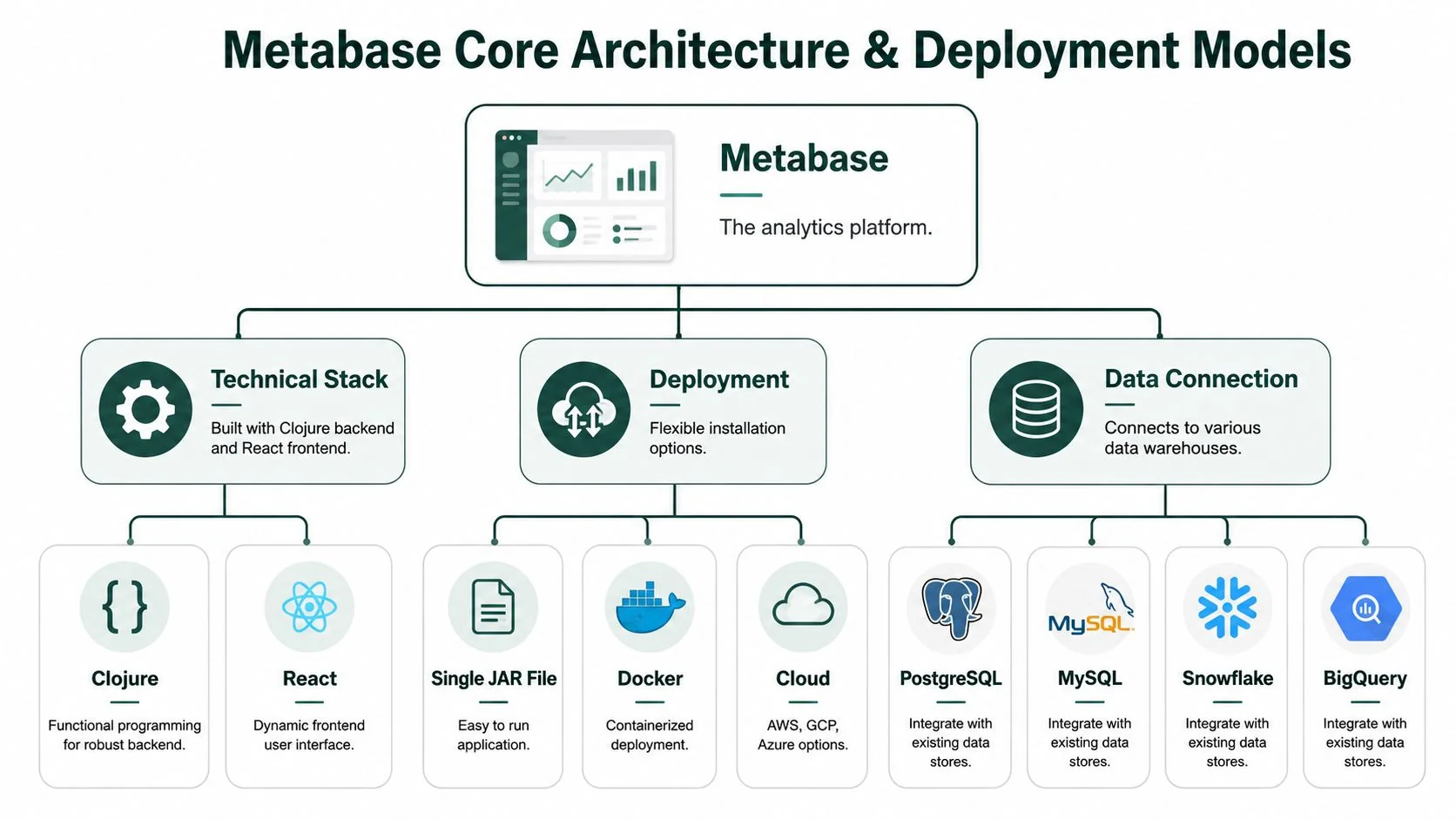
What the architecture means in practice
The JAR packaging is one reason teams get Metabase running quickly. Deployment means starting one application, connecting it to its metadata store, then wiring in your real data sources.
That doesn’t mean it’s maintenance-free. Agencies usually underestimate three things:
| Operational area | What Metabase makes easy | What still lands on your team |
|---|---|---|
| Initial deployment | Fast app startup and straightforward database connections | Provisioning app hosting, PostgreSQL, backups, upgrades |
| Data access | Broad support for common analytics warehouses and OLTP databases | Query governance, permission design, schema hygiene |
| Day-to-day use | A UI non-technical teams can use | Performance tuning, caching choices, support requests from users |
For a dev agency, the hidden cost is ownership. If you self-host, your team owns uptime, patching, user management, and the conversations that start when a client asks why a dashboard is slow at the end of the quarter.
Self-hosted versus managed responsibility
Most agencies should treat deployment as a control-versus-labor decision, not a feature decision.
Self-hosting makes sense when clients care about cloud tenancy, database locality, or contractual control. It also helps when your team wants to standardize analytics inside AWS or another existing environment. That’s often the cleaner model for regulated client work and for agency-built platforms that need a reporting layer inside the same delivery boundary.
A lighter-touch option can reduce operational burden, but then you’re giving up some control. For agencies doing embedded analytics or custom data products, that trade usually matters less. The question is whether the account team wants to sell analytics as a managed capability or keep it as a convenience feature.
A simple decision framework
Use this framework when pricing analytics work into an engagement:
| Deployment choice | Best fit for agency use | Main upside | Main downside |
|---|---|---|---|
| Self-hosted in agency environment | Internal reporting, repeatable accelerators, lower-risk client dashboards | Full control over stack and process | Your team carries maintenance burden |
| Self-hosted in client environment | Enterprise clients, strict governance, sovereignty requirements | Client keeps infrastructure control | More setup friction and slower onboarding |
| Managed option | Fast rollout, lower ops load, less infra work | Faster launch | Less control over environment and integration boundaries |
If your client stack already includes Snowflake, BigQuery, or a more formal warehouse layer, the best implementation work often happens upstream. Teams evaluating warehouse design and governance usually benefit more from work like optimizing data platforms with Faberwork before they obsess over the dashboard layer.
Don’t let a cheap BI tool hide an expensive data model. Metabase is only as clear as the schema and permissions underneath it.
Key Features for Agency Operations and Client Work
The feature list only matters if it changes delivery. That’s the test.
Metabase gives agencies a useful split between accessibility and control. Embeddable’s overview of Metabase describes a no-code query builder that translates user questions into SQL automatically, plus a native SQL editor for advanced users. It also points to the core working objects inside the product: questions, dashboards, models, metrics, and collections.
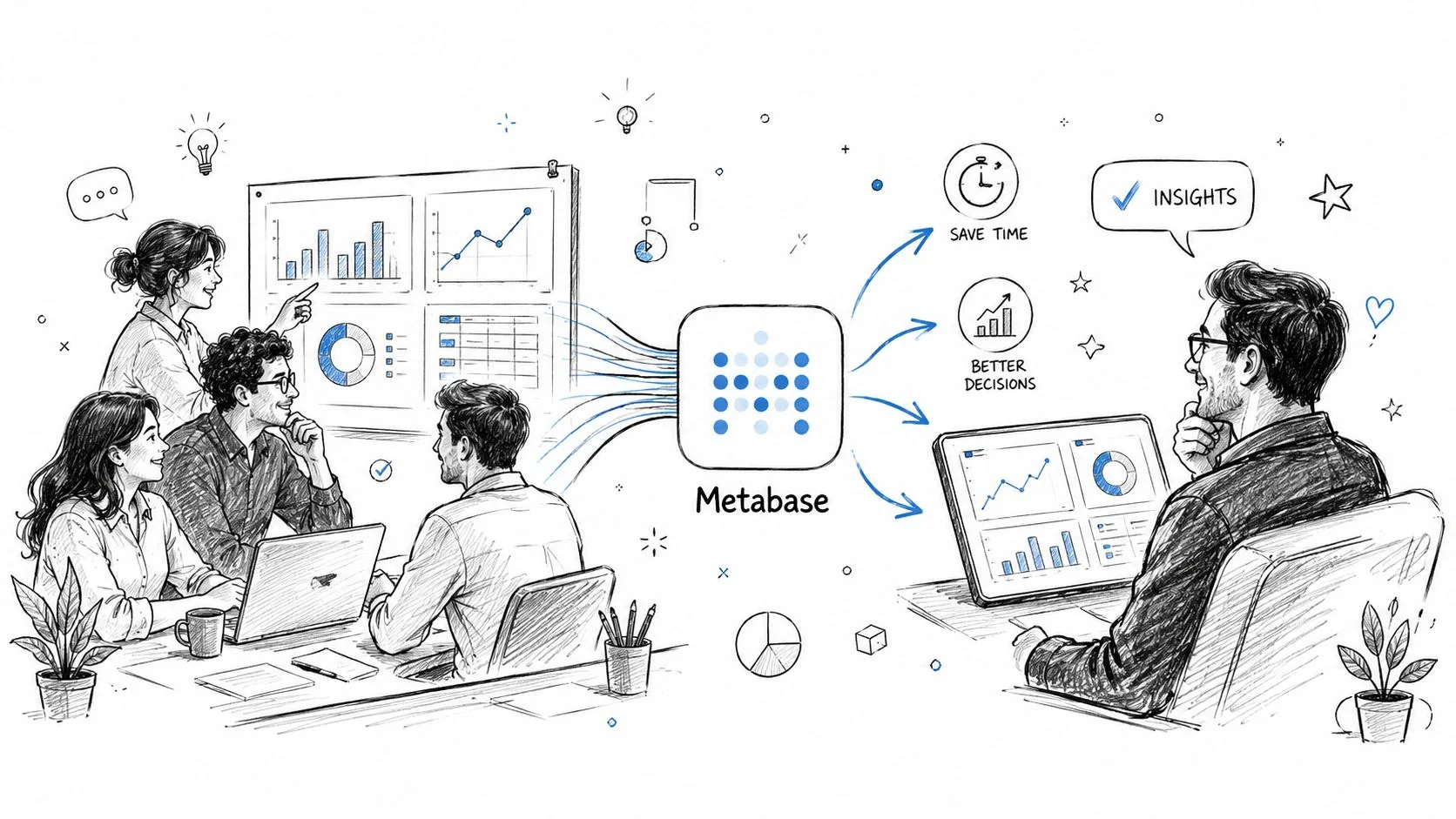
Internal operations without analyst bottlenecks
A delivery manager wants to track project burn against budget. A PM wants to see tickets opened versus closed by sprint. A leadership team wants a simple margin dashboard by account. Those aren’t hard analytics problems. They become expensive when every answer has to flow through a developer or data specialist.
The no-code builder helps non-technical teams handle routine questions. The SQL editor lets engineering or RevOps define the logic properly when the metric matters.
A setup that works well in practice looks like this:
| Agency need | Metabase feature | Real operational effect |
|---|---|---|
| PM wants a live project view | Questions and dashboards | Fewer manual status decks |
| Ops needs repeatable definitions | Models and metrics | Less confusion over “whose number is right” |
| Engineers need precise logic | Native SQL editor | Complex reporting doesn’t get trapped in no-code limits |
| Leadership needs team-wide access | Collections and sharing | Reporting becomes part of operating rhythm |
Agencies that run tighter delivery have better proof. Better proof turns into better case material, sharper niche claims, and stronger sales conversations.
Client-facing analytics that increase stickiness
Metabase also fits client work where the deliverable includes visibility into the software.
For SaaS builds, marketplaces, internal tools, and ops platforms, embedded dashboards can become part of the product experience. Clients don’t have to ask your team for a monthly export when the data is already available in context. That lowers support noise and makes your work feel more complete.
A short product tour shows the interface before you decide how much of this belongs in your delivery process.
The best client dashboards answer the questions the client asks repeatedly. If nobody asks for it twice, it probably doesn’t belong on the first dashboard.
Where features stop helping
Metabase’s no-code side is fast. Once the business logic gets messy, a competent SQL user still needs to step in. Agencies that pretend otherwise usually end up with dashboards that are easy to build and hard to trust.
That’s why the right operating model is mixed. Let non-technical users explore. Let technical owners define the important metrics. Keep the reusable logic centralized.
Metabase Versus Common BI Alternatives
For agencies, the useful question is which BI tool fits the shape of the business they run, not which one has the most features.
The mistake is treating Metabase as a universal replacement for enterprise BI. DataOpsSchool’s review of Metabase makes the limit plain: while over 50,000 companies use Metabase, it is not a replacement for full data warehouses or purpose-built observability platforms. The same review says it is best for startups and SMBs needing accessible BI fast, not large enterprises with complex, high-volume data needs, and points to gaps around caching and security at production scale.
The agency view of the trade-off
That limitation doesn’t rule Metabase out. Most agencies don’t need enterprise BI everywhere. They need a tool that can support internal reporting, client dashboards, and embedded analytics without creating a procurement project.
Where Metabase usually wins is speed, flexibility, and cost discipline. Where it loses is the top end of enterprise scale, governance complexity, and the broader ecosystem support that larger buyers sometimes expect by default.
| Criterion | Metabase Open-Source | Power BI | Looker Google Cloud Core |
|---|---|---|---|
| Licensing model for core use | Free self-hosted open-source edition with no user limits or core feature gates in the open-source edition | Commercial licensing model | Commercial platform model |
| Best fit for agencies | Internal reporting, client dashboards, embedded analytics, fast deployments | Microsoft-centric client environments | Larger organizations with established data platform strategy |
| Developer experience | Friendly for engineering teams that want direct database access and SQL control | Often strongest where Microsoft stack is already standard | Better fit when semantic modeling and enterprise governance are central |
| Client embedding potential | Strong option for agencies building customer-facing analytics experiences | Possible, but usually less attractive as a lightweight embedded choice | Often better for larger product analytics programs with bigger budgets |
| Enterprise-scale fit | Limited for complex, high-volume needs | Stronger enterprise footprint | Strong enterprise footprint |
| Operational burden | Low license cost, but self-hosting adds maintenance | Vendor-managed trade-offs vary by setup | Vendor-managed trade-offs vary by setup |
| Where it falls short | Not a warehouse, not a stream processor, not an observability platform | Can feel heavy for small teams or non-Microsoft stacks | Higher complexity and cost than many agencies need |
When Metabase is the wrong choice
Use something else if the client problem is one of these:
| Scenario | Better direction |
|---|---|
| Enterprise-wide governed analytics across many business units | Looker or another enterprise BI platform |
| Deep Microsoft stack alignment and procurement comfort | Power BI |
| Real-time operational observability | Purpose-built observability tooling |
| Underlying data architecture is immature | Fix the warehouse and modeling layer first |
For niche agencies, tool choice affects margin and positioning. If you serve mid-market SaaS, marketplaces, or internal platform teams, Metabase often helps you ship more value with less software overhead. If you serve heavily governed enterprise analytics programs, using Metabase as your default answer can make you look underpowered.
Secure Implementation for Client Projects
Security is where a useful dashboard becomes a liability if the implementation is sloppy.
Metabase has one architectural advantage that matters immediately for client work. According to Metabase’s documentation on how it works with your database, the platform processes queries inside the connected database, sending SQL and visualizing the results without storing raw data itself. The same documentation notes that teams can deploy within their own cloud account, such as AWS, so data sovereignty and access controls remain managed by the organization, not the BI vendor.
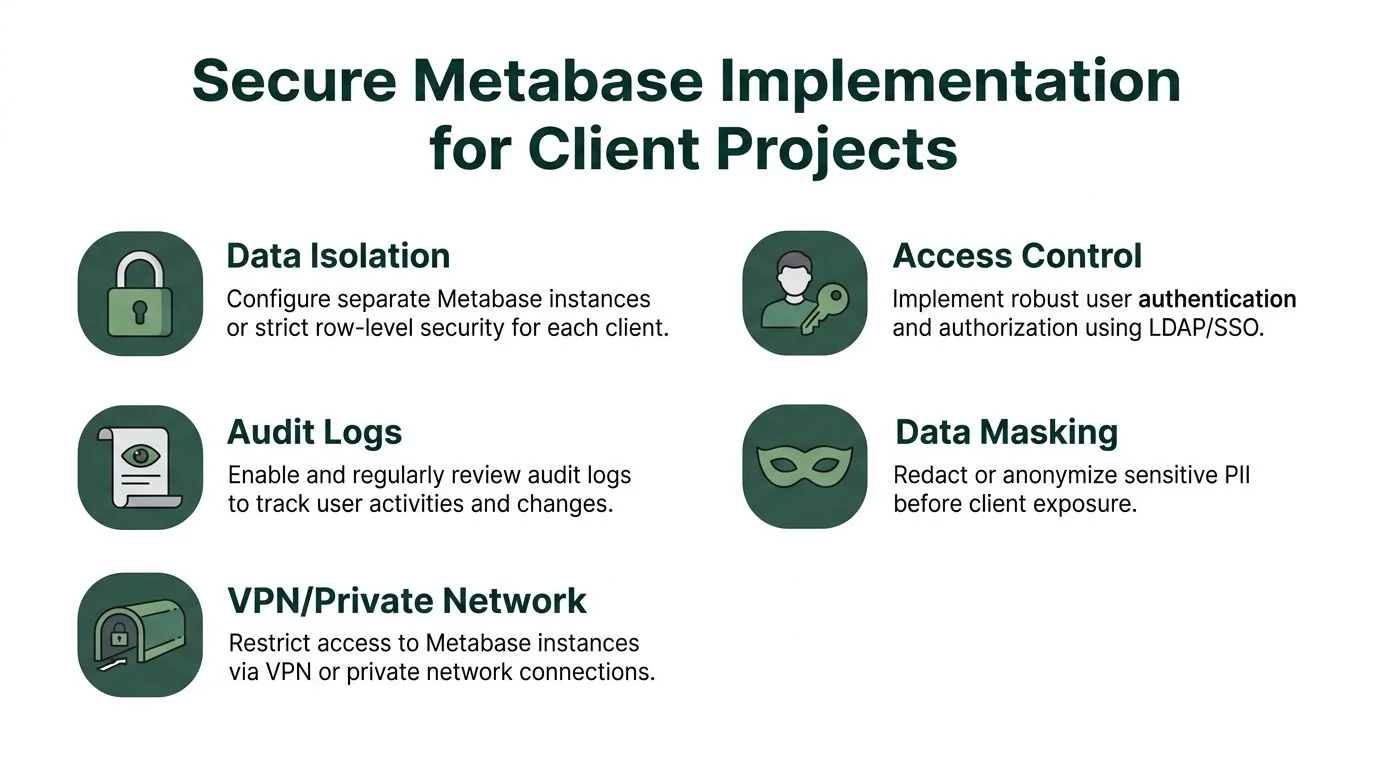
What secure setup looks like
That architecture helps, but it doesn’t secure anything by itself. Your team still has to design access correctly.
For client projects, the baseline should look like this:
- Separate sensitive tenants clearly. Use separate instances when the contract or risk profile justifies it. If not, enforce strict row-level separation so each client only sees its own records.
- Control columns, not just rows. Teams often hide the wrong thing. PII, financial fields, internal notes, and support metadata should be restricted before anyone starts designing dashboards.
- Embed with identity in mind. If the dashboard sits inside a client product, the access model should line up with that product’s user roles.
- Review audit behavior. If a client asks who viewed what or when a permission changed, you need an answer that doesn’t rely on memory.
The failure pattern agencies repeat
The most common failure is convenience-driven overexposure, not a spectacular breach.
A team gets the dashboard working for one stakeholder, then widens access because the client wants “just one shared link for now.” That shortcut becomes permanent. Then someone notices the filters allow access to records that should never have been visible in the first place.
Client-safe analytics starts at the database permission layer. The dashboard is only the surface.
A practical checklist before launch
| Control area | What to verify before a client sees anything |
|---|---|
| Data isolation | Tenants can’t pivot into each other’s records |
| Authentication | Users sign in through a controlled identity path |
| Authorization | Roles map cleanly to what each user can view |
| Sensitive fields | Restricted or removed from exposed datasets |
| Auditability | User activity and permission changes are traceable |
| Network boundary | Access is limited to approved environments |
Agencies don’t get credit for dashboards that merely look polished. They get credit for dashboards clients trust enough to adopt, and that trust comes from implementation discipline.
Conclusion Using Metabase to Build Niche Authority
Most agencies think about Metabase as an internal reporting tool or a client dashboard layer. That’s too small.
The better use is strategic. If your agency serves a defined niche, Metabase can help you turn raw operating data into public proof. That could be benchmark dashboards for app performance by stack, shipping velocity by product maturity, support workload patterns by SaaS segment, or release cadence trends across a narrow category you already understand.

Why public analytics beats generic content
Agencies publish endless thought leadership that says nothing testable. Buyers skim it and move on.
A public dashboard is different. It gives prospects something they can inspect, cite, and compare against their own situation. That shifts your agency from “company with opinions” to “company with a useful dataset.” In crowded categories, that difference matters more than another service page.
How to use Metabase for niche ownership
A practical model looks like this:
| Step | What the agency does | Why it helps pipeline |
|---|---|---|
| Pick a narrow niche | Focus on one buyer type or technical category | Makes the data more credible and easier to own |
| Build a reusable dataset | Aggregate non-sensitive delivery or market data you can legally publish | Creates a proprietary asset competitors don’t have |
| Publish an interactive dashboard | Let prospects explore the numbers themselves | Increases trust and time spent with your insight |
| Turn findings into content and outbound | Use charts, patterns, and commentary in articles, sales emails, and LinkedIn | Gives sales and marketing real material, not recycled claims |
A niche agency with original data usually outclasses a broader agency with louder messaging.
The business case
Metabase is useful because it can be more than a free BI tool. It can be part of delivery, part of retention, and part of market positioning if you use it to surface insights clients and prospects can’t get elsewhere. That’s the strategic angle founders should care about.
If your agency wants to turn analytics into actual market visibility, the missing piece is usually the positioning system around the dashboard. That’s where a sharper approach to SEO for software development agencies matters. The agencies that win more pipeline do more than build dashboards: they use the data inside them to own a niche, publish evidence, and become the obvious choice.